BONGO PRIVACY POLICY

BONGO Soccer/Football do not collect or publish any personal information.

We do not ask for any information containing phone numbers, addresses or other personal information.

If you would like to report any violations of this policy, please contact us at aficionado@live.in
A judge has dismissed Microsoft co-founder Paul Allen’s lawsuit against Google, Apple, Facebook and others for patent infringement.
Back in August, Allen originally claimed that 11 different companies, including YouTube, Netflix and AOL, had violated four different patents associated with web search and e-commerce. These patents are tied to both software and business methods.
Now, however, a court has sided with Google et al. in a motion to dismiss the case, saying Allen’s claims were too vague and lacked “adequate factual detail to satisfy the dictates of Twombly and Iqbal” — two cases that are precedents for requiring adequate evidentiary support.
The decision further states that Allen “has failed to identify the infringing products or devices with any specificity. The Court and Defendants are left to guess what devices infringe on the four patents… These allegations are insufficient to put Defendants on ‘notice as to what [they] must defend.’”
Allen will have until December 28 to return to the court with a more specific complaint.
The patents Allen is claiming were infringed upon are as follows:
  • United States Patent No. 6,263,507 issued for an invention entitled “Browser for Use in Navigating a Body of Information, With Particular Application to Browsing Information Represented By Audiovisual Data.”
  • United States Patent No. 6,034,652 issued for an invention entitled “Attention Manager for Occupying the Peripheral Attention of a Person in the Vicinity of a Display Device.”
  • United States Patent No. 6,788,314 issued for an invention entitled “Attention Manager for Occupying the Peripheral Attention of a Person in the Vicinity of a Display Device.”
  • United States Patent No. 6,757,682 issued for an invention entitled “Alerting Users to Items of Current Interest.”
Do you think this lawsuit still stands a chance?
The pace of innovation in the technology industry quickened again in 2010, after stumbling momentarily in 2009 because of the global recession. The most potent sign of the rebound was the steady stream of new products, new technologies, and new ideas that pushed the previous boundaries and rethought the status quo.
Of course, innovation means taking risks and some of them — including some the most widely publicized — turn out to duds. And, even some of the most successful new products get overhyped and oversold.
That’s the subject of this week’s Monday morning editorial: the most overhyped products of 2010. Here’s my list.

1: Stay away from retail stores

If you want to get a good deal on a laptop, stay away from major electronics retailers. I don’t want to name names, but there is one major electronics store within half an hour’s drive of my house. I have noticed that its prices are always the same as the MSRP listed on the Internet. Even the store’s sale prices are more expensive than what you would pay if you were to buy the same laptop online.
Of course, the price isn’t the only reason I recommend avoiding the major electronics stores. Things like high pressure sales tactics and upcharges for things I don’t want (such as extended warranties, setup, software suites, and delivery) are enough to drive me insane. Unless I need a computer immediately I avoid the electronics stores at all costs.

2: Decide what’s important to you

t’s quite possible that 2010 will be remembered as the year that the tablet revolution began. After Apple’s unveiling of the iPad in January, I frankly would never have predicted that the company would sell over 7 million during the product’s first six months on the market. It has clearly touched a nerve and a slew of multi-touch tablet copycats are lining up to compete with it.
I also think it’s fair to say that the tech world has been a bit over-infatuated with tablets this year — myself included, at times. While tablets are starting to make a lot of sense for workers who spend their days on-the-go, in conference rooms, and on-site with clients, there are still plenty of employees who remain tied to their desks for most of the day and are under a lot of pressure to produce.
For these workers, the desktop computer remains the best tool for the job. And, so we don’t forget that this is still the silent majority of computer users, here are four ways to optimize the desktop experience and maximize productivity using some of the latest technologies.

Name: BridgeURL

Quick Pitch: BridgeURL does one simple task. Users can input multiple links and generate one URL that will display all listed links in a slideshow format.
Genius Idea: URL-shortening services have become extremely popular and necessary in today’s age of short-form status updates. You’ve probably already latched on to either Bit.ly, Ow.ly or one of the many others; but newcomer BridgeURL has a completely distinct value proposition that sets it apart from the rest with one useful function — multiple-link sharing.
With BridgeURL, you can input multiple URLs and click “Create Link” to have the service generate a single URL that you then copy to share on
Android smartphone market share trails iPhone market share by a scant 9 percentage points in a recent study from analysis giant Nielsen.
According to statistics on overall U.S. market share, Android is the single fastest-growing mobile platform. By contrast, Apple’s iOSshows an ever-so-slight decline.
Other operating systems, including BlackBerry and Windows Mobile, show sharp declines over the past quarter. Still, BlackBerry is the top mobile OS by the numbers, with around 30% of the total market share.
Last month, Nielsen’s stats showed that Android was the preferred platform of new smartphone buyers, suggesting that big-budget marketing campaigns for devices such as theDroid lineup and HTC’s Evo were paying off.
In fact, Androids outsold iPhones for the first time ever in the first half of 2010.
Nevertheless, these stats still show iOS devices as the leading smartphones in the Android-versus-iPhone battle. Today, Android has 19% of the mobile OS market, while Apple’s iOS smartphones have 28%.


Age also plays a role in which device a given smartphone user is likely to choose. Members of the under-35 crowd
For over two decades Microsoft and Apple have had the technology industry’s most high-profile (and occasionally the most rancorous) rivalry. But today, I doubt that either of them considers the other to be its chief rival.
If you could sequester either Apple CEO Steve Jobs or Microsoft CEO Steve Ballmer in their office and close the door and ask (off the record) for the name of their top rival, I suspect both of them would give you the same answer: Google.
For that reason alone, you’d think Microsoft and Apple would be more likely than ever to collaborate (and that’s certainly a possibility). However, it’s also easy to forget that the two companies have a long history of working together and developing products for each others’ platforms. They are traditional frenemies.
The fact that Microsoft released Office for Mac 2011 this week (more on that in a second) is only the latest example of times when the two have been on the same page. These are still the exception rather than the rule, but we’ve come up with a list of the 10 best collaborative moments between the two companies.


10. Microsoft launches Outlook for Mac in Office 2011

With Office for Mac 2011, released on October 26, Microsoft has once again made the Mac OS X version of its world-dominant productivity suite jive a lot more closely with the latest Windows version, after several Mac editions that diverged wildly from their Windows counterparts in recent years. But, by far the most significant part of Office 2011 is that it brings back a version of Microsoft Outlook for email and Exchange syncing, replacing the Mac-specific Entourage (a horribly buggy piece of software). This makes the latest Macs much better equipped to function in the business world.

9. Apple and Microsoft spurn Blu-ray for digital downloads

Both Apple and Microsoft have been under pressure for the last couple years to get on the Blu-ray bandwagon. Microsoft has been under pressure to put Blu-ray in Xbox 360 and Apple has been under pressure to put Blu-ray drives in Macs. However, both have resisted and have responded with the same reason why: Blu-ray is an expensive temporary solution and the future of high definition video is digital downloads


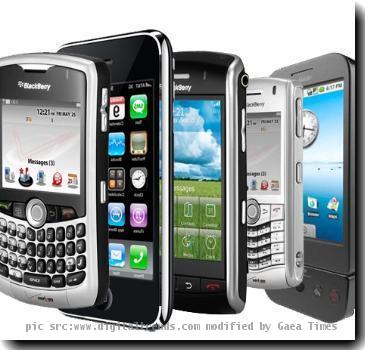
A smartphone is one thing that makes your life smarter and smoother. In this fast-paced technology age, we need to keep in touch with internet everytime. Smartphone provides instant access to the internet and email and thus helps you communicate with your clients, colleagues, friends and family anytime, anywhere. It also serves as a multimedia device. You can have entertainment while playing a MP3 or watching a full-lengh movie on your smartphone. Third party applications also get a boost with smartphone allowing thousands of apps to download at various prices. Here we go with our top ten picks for smartphones of 2010.

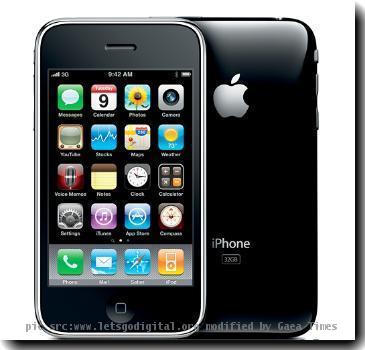
1. Apple iPhone 3GS

Re: Apple iPhone 3G
Apple iPhone 3G hold the top rank in our list. People became crazy with its handful of new features and apps as it hit the stores on June 19, 2009. Here are some striking features of Apple iPhone 3Gs.
  • 3.5″ Touchscreen
  • 32 GB memory
  • 3.2 megapixel auto focus camera
  • extended battery life
  • Video recorder

2. Motorola Droid

motorola-droid-2
It has a gorgeous display with 440×854 resolution. It has improved speeds over the previous Android devices. It enables faster web browsing.
  • 3.7″ screen size
  • 5 megapixel camera
  • 256 MB memory
  • Google Maps Navigation app
  • Video recorder
  • better messaging and contact management

3. HTC Nexus One by Google

nexusone
Nexus One greatly enhances the Google Android family with a fast processor, good call quality, and improved voice control features. Moreover, all versions of the phone will be unlocked.
  • 5 megapixel camera
  • 512 MB memory
  • 3.7-inch AMOLED touchscreen
  • classic display with a resolution of 480×800 pixels
  • runs on Android 2.1 operating system.
  • 2.1, Stereo Bluetooth.
  • 10 hours talk time.

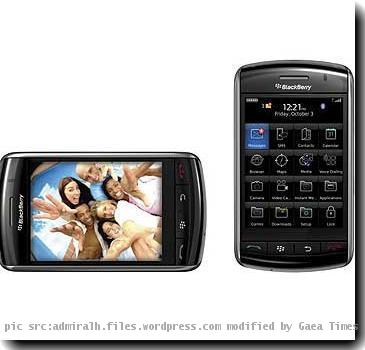
4. BlackBerry Storm 2

Re: BlackBerry Storm 2
Smartphone from BlackBerry is a dashing one. It looks awesome. It has a display of high resolution. Other key features include:
  • Large, 3.25″ touch screen displays
  • 3.2 MP camera with video recording
  • High resolution 480 x 360 pixel color display
If you had been holding on to Microsoft Windows XP and just recently made the move to Windows 7, you’ve begun to discover that a lot has changed in the operating system besides just the new user interface with all its new bells and whistles.
For example, chances are that one of the first places that you probably turned to when troubleshooting problems in Windows XP was the Event Viewer. Well, when you get to Windows 7’s Event Viewer, you are in for a new experience.
In this edition of the Windows Desktop Report, I’ll introduce you to some of the new features in Windows 7’s Event Viewer.
This blog post is also available in PDF format in a TechRepublic download.

An overview

As you know, Event Viewer maintains logs that record information about program, security, and system events that occur on your system. While XP’s Event Viewer is an effective tool that you can use to view and manage event logs, gather information about hardware and software problems, as well as monitor security events, it does have some shortcomings. Perhaps the biggest drawback is that XP’s Event Viewer does such a good job at logging events, that the number of items in the log can be staggering. As such, sorting through the logs can be a very daunting task. To add insult to injury, not all the events are documented very well and many aren’t documented at all — often leaving even the most experienced troubleshooter puzzled.
Another drawback in the system stems from the fact that Windows XP has other logs that are stored as text files on the hard disk. This means that when troubleshooting problems, you may have to scan through a bunch of text files in addition to scanning through Event Viewer.
Fortunately, Windows 7’s developers have spent a great deal of time and effort on improving Event Viewer. Let’s take a closer look.

The new Event Viewer

To begin with, the Windows 7 version of the Event Viewer has been completely rewritten with a new user interface that makes it much easier to filter and sort events as well as control which type of events are logged. In addition, you can now perform some basic diagnostic tasks right from within Event Viewer itself.
Microsoft has stated that they are going to impose stricter standards in order to ensure that events logged in
A friend mentioned that his one-year-old Windows 7 system was taking much longer to boot than it used to. I explained to him that Microsoft had done a lot of work to make Windows 7 boot up much faster than previous versions of the operating system but that slightly slower boot times were inevitable. As you add more applications and utilities, it will, of course, take a bit longer to boot up the system.
While my friend agreed with that statement, he was adamant that his system was taking much longer to boot up than was acceptable — he estimated that on a regular basis it was taking close to two minutes to boot up! While that might have been more common during the Windows 2000 or XP eras, I agreed that what he was enduring was probably longer than it should have been. (Keep in mind that there are hundreds of variables that can come into play that affect boot time, such as processor speed, memory speed, hard disk speed, as well as the types of applications and drivers that run during startup.)
I arranged to go over to his place and help him troubleshoot and fix his slow-booting Windows 7 system. As it turned out, it was a pretty simple procedure, and we had his system booting up much quicker in no time at all. All I had to do was delve into Windows 7’s Event Viewer, tap in to the correct log, and create a Custom View to ferret out the correct Event IDs, and then the problem and solution became readily apparent.
In this edition of the Windows Desktop Report, I’ll show you how to use some of the new features in Windows 7’s Event Viewer to investigate the boot time and track down issues that can cause a slowdown in the boot process.
This blog post is also available in PDF format in a TechRepublic download.

Overview

Windows 7’s Event Viewer includes a new category of event logs called Applications and Services Logs, which includes a whole host of subcategories that track key elements of the operating system. The majority of these subcategories contain an event log type called Operational that is designed to track events that can be used for analyzing and diagnosing problems. (Other event log types that can be found in these subcategories are Admin, Analytic, and Debug; however, describing them is beyond the scope of this article.)
Now, within the operating system section is a subcategory titled Diagnostic-Performance with an Operational log that contains a set of a Task Category called Boot Performance Monitoring. The Event IDs in this category are 100 through 110. By investigating all the Event ID 100 events, you will be able to find out exactly how long it took to boot up your system every time since the day you installed Windows 7. By investigating all the Event ID 101 thru 110 events, you will be able to identify all instances where boot time slowed down.

Getting started

You can find and launch Event Viewer by opening the Control Panel, accessing the System and Security category, selecting the Administrative Tools item, and double-clicking the Event Viewer icon. However, you can also simply click the Start button, type Event in the Start Search box, and press Enter once Event Viewer appears and the top of the results display.

Creating a Custom View

Once you have Event Viewer up and running, you can, of course, drill down through the Applications and Services Logs and locate the Diagnostic-Performance Operational log and begin manually looking through the events recorded in the log. However, you can save yourself time and energy by taking advantage of the new Custom View feature, which is essentially a filter that you can create and save.
There are thousands of geeky t-shirts available from numerous places on the web, but ThinkGeek has topped them all with a shirt that plays sounds and music through a large speaker on the front. The Personal Soundtrack Shirt, which was originally an April Fool’s joke, comes with 20 pre-programmed sounds - but you can also load your own MP3 files and discreetly play them (and adjust the volume) with a battery-operated, wired remote.

Features

  • A speaker on the front plays background music and sound effects at your command
  • The wired remote has 20 buttons for the easy selection of 10 music themes and 10 different sound effects:
Included Musical Themes
Included Sound Effects
Royal EntranceCheering
Sexy Time ThemeDrum Roll
Disco FloorCat Call Whistle
Silent Movie Chase ThemeLaugh Track
True LoveBooing
Scary MovieCrying
Spy Mission“Wrong Answer” Buzzer
Super Hero RescueRim Shot
Western ShowdownMetal Air Guitar
Game ShowPolice Siren
  • You can easily load your own sound effects and music onto the Personal Soundtrack Shirt using standard MP3 files
  • If you accidentally remove the original MP3s that came on the shirt, simplydownload the replacement .zip (8 MB), save to your hard drive, unzip the file, and place on the SD card
  • You can also play your iPod or other portable audio player through the speaker on the front of the shirt
  • It requires four AAA batteries, which aren’t included
  • All sizes (Adult Small to XXL) cost $29.99

What I like

  • Unique and entertaining: There aren’t other shirts like this on the market, and so when you wear (and play) your Personal Soundtrack Shirt, people will definitely notice. And if you have your sounds and timing down, this shirt can be extremely entertaining. I don’t think
The Apple iPad has re-energized the market for tablet computers but it has gone nearly all of 2010 without a serious challenger. That will soon change. Here are 20 upstarts taking aim at the iPad.
The best way to view this list is the companion photo gallery so that you can get a look at each of the tablets. Otherwise, you can read about each of them all and get a quick summary in the list below. I’ve only featured tablets that have at least 7-inch screens and that have been officially announced (in most cases). The list also serves as a ranking. I’ve put the ones that are the most promising and the most likely to actually make it to market at the top of the list.

1. Samsung Galaxy Tab

Based on a similar design to the Samsung Galaxy S smartphones, this 7-inch Android 2.2 tablet is loaded with strong specs and will be available on multiple carriers. It will likely be the iPad’s most serious competitor to arrive before the end of 2010.

2. Cisco Cius

Primarily an enterprise communications and collaboration device, the Cisco Cius is an 7-inch Android tablet with a heavy layer of Cisco customization on top. Consumers won’t be interested, but existing Cisco customers who want a corporate-controlled tablet might be.

3. BlackBerry PlayBook

Aimed at stopping the iPad’s momentum with executives and business professionals, the 7-inch BlackBerry tablet will be built on its own QNX operating system and is flush with power with a 1 GHz dual core CPU and 1 GB of RAM. However, battery life may be an issue and it won’t arrive until 2011.

4. Toshiba Libretto

One of the more innovative tablet competitors is the Libretto with its dual 7-inch multi-touch screens. One screen can be used entirely as a virtual keyboard while you work on the other. It runs Windows 7 acts a little more like a netbook than a tablet but it’s an interesting concept.

5. ASUS Eee Pad

Now one of the world’s top five computer makers and one of the leaders in design, ASUS has talked throughout the year about launching various iPad competitors (branded “Eee Pad”) from 9-inch to 12-inch models, running Windows 7, Windows Embedded Compact, or Android. ASUS has promised a tablet will be coming in the first quarter of 2011.

6. Lenovo IdeaPad U1 Hybrid

One of the big hits of CES 2010, the IdeaPad U1 Hybrid is a convertible tablet with a multi-touch screen that detaches from a hardware keyboard. The main system runs Windows 7 but the detachable 11.6-inch screen turns into a standalone tablet running Linux. It has been delayed until 2011, but Lenovo says the standalone tablet will be released separately as the Lenovo LePad in December.

7. Archos 10.1

There are a number of ways to open a Word file. Use Open from the File menu, tab or Office button, click the Open icon, or even double-click an item in Windows Explorer to launch Word and the file. Then, there are the not-so-intuitive methods such as using the Most Recently Used list or opening a file from the Start menu.
Using Open, you can open several documents with one effort. First, open the Open dialog box by choosing Open from the File menu or tab (2010) or by clicking the Office button (in 2007). Once this dialog box is open, there are two ways to specify multiple files:
  • Adjacent files: To select contiguous files, click a file, hold down the [Shift] key, and then click a second file. Word will select both of the clicked files and all the files in-between.
  • Nonadjacent files: To select non-contiguous files, hold down [Ctrl] while clicking each file you want to open.
You can even use a combination of the two selection methods to specify both contiguous and non-contiguous blocks of files at the same time. For instance, to create the selection block shown below, you’d do the following:
  1. Click the file named 501.
  2. Hold down [Shift] and click 615.
  3. Release [Shift] and press [Ctrl].
  4. Click files 616 and 715.
  5. Click file 726.
On 14 August 2010, Japanese developer Masato Kinugawa reported a scripting vulnerability in Twitter’s automatic URL-linking functionality. Twitter reportedly fixed the problem, but with an upgrade to the service in September, the problem appears to have been reintroduced.
Comprehensive test coverage is a means developers use to ensure code quality. In test-driven development, programmers create tests before there’s even any code to test, then write code to satisfy the requirements of the tests. Less extreme approaches to test coverage are probably more common in practice, and are sometimes a better approach to tackling a particular development project. For a major project like maintaining the Twitter codebase, though, at least some kind of testing coverage is important — including regression testing and other means of checking for the re-emergence of previously fixed errors in new code.
A particularly common means for the reappearance of old errors is poor version control practice. Perhaps even more important for protecting against the reintroduction of old bugs is proper use of a version control system. For those who are not familiar with the concept, version control software is like a highly optimized means of keeping backups during software development that can help do things like back out of changes that turned out to be a bad idea, keep all developers on a project up to date, merge changes between separate development branches, and manage patches. If new code is improperly merged with old, allowed to become out of sync then committed in a way that clobbers previous fixes, or otherwise mismanaged in version control, or if version control is simply not used at all and human beings have to manually handle the tasks automated by version control, previously fixed bugs can all too easily be reintroduced with new code.
Antivirus companies are already working on the 2011 version of their antivirus software. Since the numbers of viruses over the internet are exceeding to the unbearable limits, antivirus companies are aggressively working on their antivirus programs to take a spot in the top ten antivirus 2011 worldwide. It would be extremely interesting to see who takes the top spots when the antivirus 2011 versions are rolled out. Most companies roll out their newer versions sometime in July or August. So it is suspected that most top antivirus manufacturers will roll out the new version by August this year.

Top Ten Antivirus 2011

To rate the top ten antivirus 2011 a strong criteria will be used. The antivirus software will be measured on various factors like technology, stealth, speed, price, support, configuration, ease of use and more. As we move on with time, speed keeps becoming even more important factor. Also, pricing is another major factor that will looked at while ranking the top ten antivirus 2011 software. We will be evaluating some of the best antivirus programs. The list is quite long but to lay down a few, here are the most recommended antivirus programs of 2011:
Microsoft's handsets have been overshadowed by Apple's iPhone, Google's Android devices, and Research In Motion's BlackBerry.
 The goal for Microsoft’s latest smartphone is an ambitious one: to deliver a phone that truly integrates the things people really want to do, puts those things right in front of them, and either lets them get finished quickly or immerses them in the experience they were seeking.


“When you first get the phone, the stuff that’s more obvious makes you smile,” says Andy Lees, Microsoft’s Mobile Communications Business president. On the phone’s Start screen, “live tiles” show users real-time content, such as social media updates and contacts. “The features sort of scream out at you,” says Lees. “But the other thing that is even deeper for me is the elegance of the experience, which you only appreciate if you’ve used the phone for some time.”
Learn more about Windows Phone 7
The result is Windows Phone 7, which will make its debut in some European markets on Oct. 21 and in the U.S. Nov. 8. The phone uses an elegant operating system that is very different from the current trend toward app-focused phones. Instead it provides active and configurable interface elements called tiles that update on the fly with real information, allowing users to place the tiles that interest them most where they want on their Start screen. Facebook photos, music and contacts are pulled into the phone and distributed appropriately across Hubs. It also brings together many of Microsoft’s popular offerings from other platforms, including Xbox, Zune, Office and Bing.
The new phone is an important step for Microsoft in three ways. To begin, it is a

Samsung has announced three more handsets in its Wave family -Wave 525 (GT-S5250), Wave 533 (GT-S5330) and Wave 575 (GT-S5750). All three handsets will run Samsung Bada operating system and on top of it will rest TouchWiz 3.0 interface. Just two days ago, Samsung had unveiled new Wave II S8530 that too runs Bada OS and sports 3.7-inch super-clear LCD screen.

Samsung Wave S5250 already available in Russia while Samsung Wave533 be introduced lataer this month over there. Both phones would gradually hit CIS, Europe, Latin America, Asia, Middle East, Africa and other countries. Sweden will get Samsung Wave S5750 in mid-November and then it would be released in Europe, Southeast Asia and China. Prices of neither of the handsets were announced.

New entrants to Wave and Bada family - Samsung Wave 525 (GT-S5250), Samsung Wave 533 (GT-S5330) and Samsung Wave 575 (GT-S5750) handsets have similar specifications. Out of these three phones, Wave S5330 will be a slide-out QWERTY with a full touchscreen. While Wave S5250 and S5750 smartphones will come in candy bar form factor sporting full touchscreen.

Samsung Wave S5250 Specifications:


- 2G Network:GSM 850 / 900 / 1800 / 1900
- GPRS Class 10 (4+1/3+2 slots), 32 - 48 kbps
- EDGE Class 10, 236.8 kbps
- 3.2-inch TFT capacitive touchscreen display 256K colors (240 x 400) 
- Accelerometer sensor for auto-rotate
- TouchWiz UI 3.0
- Multi-touch zoom
- 3.5 mm audio jack
- 100 MB Onboard Phone Memory 
- Up to 16GB microSD expandable 
- Wi-Fi 802.11 b/g/n
- Bluetooth v3.0 with A2DP
- 3.15 MP camera (2048x1536) with Geo-tagging & Video recording